Black On Tech

Reference 2 Video with Audio

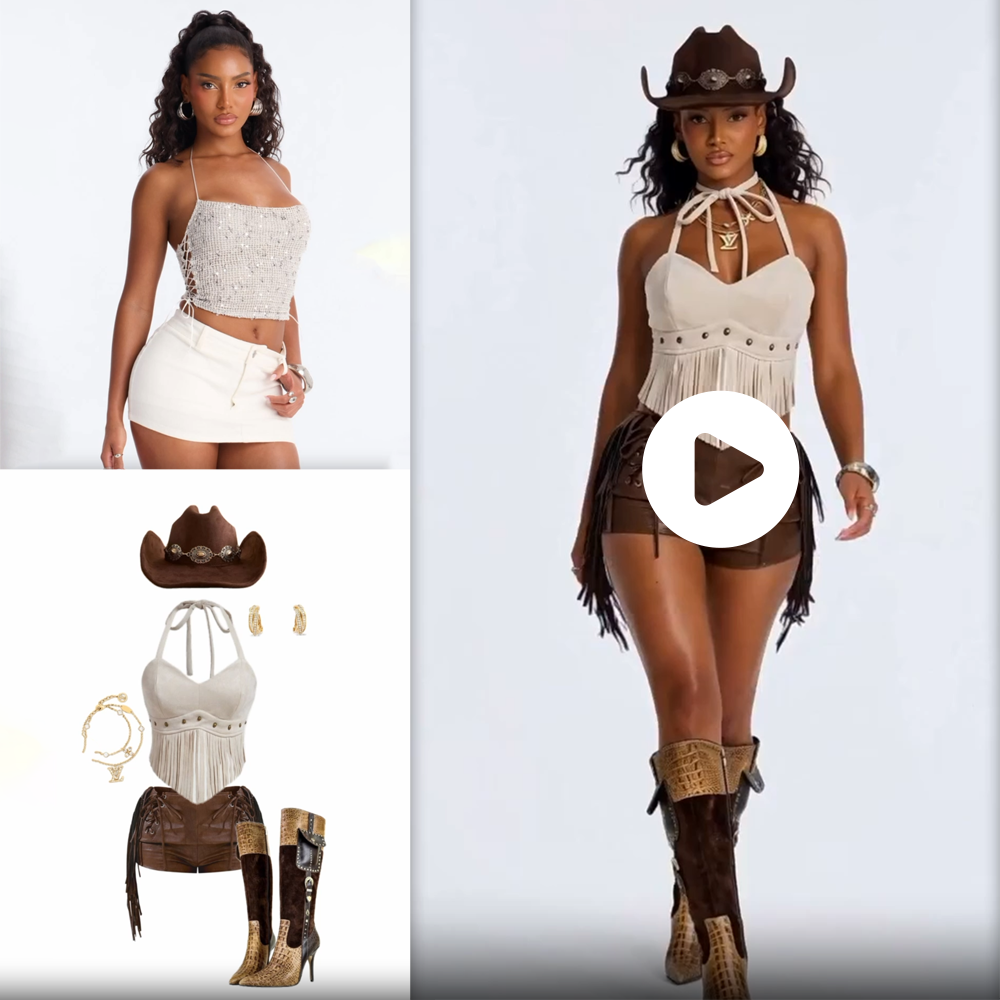
Turn Your Mood Boards into Cinematic Motion with the Black On Tech Reference Image to Video AI Workflow!

Tired of struggling with complex text prompts that never quite capture the exact style or subject you have in your head? The Black On Tech Reference Image to Video AI Workflow is a groundbreaking solution that bypasses the limitations of text by letting your images do the talking.

This highly advanced AI pipeline allows you to upload reference images—whether it’s a character sheet, a specific art style, a color palette, or a product shot—and uses them to directly drive the video generation process. The AI extracts the visual DNA of your reference photos and synthesizes it into stunning, fluid, and cohesive video content. Want a video that perfectly matches the aesthetic of a specific oil painting? Or a cinematic sequence featuring a character from your concept art? Simply input the images, and the AI will bring your exact vision to life.

Designed for art directors, concept artists, marketing agencies, and filmmakers, this plug-and-play workflow guarantees visual consistency without the guesswork of prompt engineering. Stop describing your vision and start showing it. Get the Black On Tech Reference Image to Video Workflow today and animate your inspiration!

4,999

7-Days Protection

Money Back Guarentee

24/7 Days Guarentee

Support Guarentee

Easy Payment

Debit/Credit Cards

Reference 2 Video with Audio

Turn Your Mood Boards into Cinematic Motion with the Black On Tech Reference Image to Video AI Workflow!

Tired of struggling with complex text prompts that never quite capture the exact style or subject you have in your head? The Black On Tech Reference Image to Video AI Workflow is a groundbreaking solution that bypasses the limitations of text by letting your images do the talking.

This highly advanced AI pipeline allows you to upload reference images—whether it’s a character sheet, a specific art style, a color palette, or a product shot—and uses them to directly drive the video generation process. The AI extracts the visual DNA of your reference photos and synthesizes it into stunning, fluid, and cohesive video content. Want a video that perfectly matches the aesthetic of a specific oil painting? Or a cinematic sequence featuring a character from your concept art? Simply input the images, and the AI will bring your exact vision to life.

Designed for art directors, concept artists, marketing agencies, and filmmakers, this plug-and-play workflow guarantees visual consistency without the guesswork of prompt engineering. Stop describing your vision and start showing it. Get the Black On Tech Reference Image to Video Workflow today and animate your inspiration!

4,999

7-Days Protection

Money Back Guarentee

24/7 Days Guarentee

Support Guarentee

Easy Payment

Debit/Credit Cards

Description

Dictate Your Aesthetic with the Black On Tech Reference Image to Video AI Workflow

The era of AI video generation is here, but it comes with a frustrating learning curve: the tyranny of the text prompt. No matter how many adjectives you use, words are always open to interpretation. You might type “cyberpunk aesthetic with neon blue lighting,” but the AI’s version of that might look completely different from the specific vision in your head. When visual consistency and precise art direction are required, text alone is simply not enough.

That is why Black On Tech created the ultimate solution.

Introducing the Black On Tech Reference Image to Video AI Workflow. This custom-engineered pipeline shifts the paradigm from Text-to-Video to Image-Conditioned Video. By allowing you to feed the AI direct visual references, you gain absolute authority over the style, subject, and atmosphere of your final video output.

What is the Reference Image to Video Workflow?

This workflow leverages the cutting edge of image-prompting technology (utilizing advanced adapters and visual conditioning models) to guide the video generation process. Instead of relying on a text parser to guess what you want, the AI “looks” at your uploaded images, extracts the vital visual information, and uses it as the foundational blueprint for the video.

You can provide the workflow with various types of references:

  1. Style References: Upload an oil painting, a vintage photograph, or a specific anime still, and the resulting video will perfectly mimic that exact artistic medium and color grading.
  2. Subject/Character References: Upload a photo of a specific character, actor, or product, and the AI will ensure that subject remains highly consistent throughout the generated video motion.
  3. Compositional References: Provide structural layouts to guide where the action happens on screen.

The workflow brilliantly merges these visual inputs, creating a dynamic, high-resolution video that feels like it was lifted directly from your personal mood board.

Unrivaled Features for Professional Art Direction

1. Flawless Style Transfer and Matching Whether you are producing a commercial that needs to match a brand’s specific pastel color palette, or creating an animated short in a distinct watercolor style, this workflow delivers. It captures the micro-details of your style reference—down to the brushstrokes, film grain, and contrast levels—and applies them seamlessly to every frame of the video.

2. High-Fidelity Character and Subject Consistency Maintaining the identity of a character across video frames is the holy grail of AI generation. By anchoring the generation to your uploaded character reference image, this workflow drastically reduces morphing and identity loss, ensuring your subject looks like the same person from the first frame to the last.

3. Multi-Reference Blending Capabilities Want to mix and match? The Black On Tech workflow allows you to input multiple references simultaneously. You can upload a photo of a modern sports car (Subject Reference) and a painting by Van Gogh (Style Reference), and the AI will generate a video of that exact car driving through a swirling, impressionistic landscape. The creative combinations are truly infinite.

4. Optimized, User-Friendly Architecture Underneath the hood, image-prompting networks can be incredibly complex, requiring precise weighting and node routing to prevent the video from becoming a blurry mess. We have handled all the technical optimization. The workflow is presented in a clean, intuitive dashboard. Just drop your images into the clearly labeled boxes, tweak the influence sliders, and hit generate.

Who is this Workflow Built For?

Art Directors & Creative Agencies When pitching a concept to a client, a mood board of static images is good, but a fully animated video in the exact style of that mood board is unforgettable. Use this workflow to rapidly generate high-quality pitch visualizations and animatics that perfectly convey your creative vision.

Concept Artists & Animators Bring your 2D character sheets and environmental concepts to life. Feed your original artwork into the workflow to generate dynamic background plates or character animations without having to manually animate every frame or deviate from your unique art style.

Fashion & E-Commerce Brands Upload your seasonal lookbook photography and instantly generate stylistic, high-motion video assets for Instagram Reels and TikTok. Keep the focus entirely on your specific apparel while generating infinite, visually stunning backgrounds.

VFX Artists & Filmmakers Need to generate a specific practical effect, like a certain type of explosion or a specific alien texture? Feed reference photos of the texture or practical effect into the AI to generate highly specific video assets for your compositing pipeline.

How It Works: A Streamlined Creative Process

Harnessing the power of image-conditioned video is incredibly simple with our plug-and-play setup:

  • Step 1: Upload Your References: Drop your desired style, character, or compositional images into the designated image nodes.
  • Step 2: Balance the Influence: Use simple sliders to tell the workflow how heavily it should rely on the reference images versus any text prompts you provide.
  • Step 3: Add Light Text Direction (Optional): While the images drive the look, you can use a short text prompt to dictate the motion (e.g., “camera slowly zooming in”).
  • Step 4: Generate: The Black On Tech AI pipeline synthesizes the visual data.
  • Step 5: Export: Download a visually spectacular video that perfectly matches your provided references.

The Black On Tech Commitment

Black On Tech is dedicated to building robust, commercial-grade AI tools for creators who demand precision. When you purchase this workflow, you are investing in a heavily tested pipeline that maximizes VRAM efficiency while delivering top-tier visual fidelity. We take the frustration out of AI so you can focus entirely on your art.

Stop Guessing, Start Directing

Don’t let the AI dictate the aesthetic of your projects. The Black On Tech Reference Image to Video AI Workflow gives you the ultimate superpower: total visual authority.

Bring your mood boards to life. Add the Black On Tech Reference Image to Video Workflow to your cart today and start creating with absolute precision!

Reviews

There are no reviews yet.

Be the first to review “Reference 2 Video with Audio”

Your email address will not be published. Required fields are marked *

Description

Dictate Your Aesthetic with the Black On Tech Reference Image to Video AI Workflow

The era of AI video generation is here, but it comes with a frustrating learning curve: the tyranny of the text prompt. No matter how many adjectives you use, words are always open to interpretation. You might type “cyberpunk aesthetic with neon blue lighting,” but the AI’s version of that might look completely different from the specific vision in your head. When visual consistency and precise art direction are required, text alone is simply not enough.

That is why Black On Tech created the ultimate solution.

Introducing the Black On Tech Reference Image to Video AI Workflow. This custom-engineered pipeline shifts the paradigm from Text-to-Video to Image-Conditioned Video. By allowing you to feed the AI direct visual references, you gain absolute authority over the style, subject, and atmosphere of your final video output.

What is the Reference Image to Video Workflow?

This workflow leverages the cutting edge of image-prompting technology (utilizing advanced adapters and visual conditioning models) to guide the video generation process. Instead of relying on a text parser to guess what you want, the AI “looks” at your uploaded images, extracts the vital visual information, and uses it as the foundational blueprint for the video.

You can provide the workflow with various types of references:

  1. Style References: Upload an oil painting, a vintage photograph, or a specific anime still, and the resulting video will perfectly mimic that exact artistic medium and color grading.
  2. Subject/Character References: Upload a photo of a specific character, actor, or product, and the AI will ensure that subject remains highly consistent throughout the generated video motion.
  3. Compositional References: Provide structural layouts to guide where the action happens on screen.

The workflow brilliantly merges these visual inputs, creating a dynamic, high-resolution video that feels like it was lifted directly from your personal mood board.

Unrivaled Features for Professional Art Direction

1. Flawless Style Transfer and Matching Whether you are producing a commercial that needs to match a brand’s specific pastel color palette, or creating an animated short in a distinct watercolor style, this workflow delivers. It captures the micro-details of your style reference—down to the brushstrokes, film grain, and contrast levels—and applies them seamlessly to every frame of the video.

2. High-Fidelity Character and Subject Consistency Maintaining the identity of a character across video frames is the holy grail of AI generation. By anchoring the generation to your uploaded character reference image, this workflow drastically reduces morphing and identity loss, ensuring your subject looks like the same person from the first frame to the last.

3. Multi-Reference Blending Capabilities Want to mix and match? The Black On Tech workflow allows you to input multiple references simultaneously. You can upload a photo of a modern sports car (Subject Reference) and a painting by Van Gogh (Style Reference), and the AI will generate a video of that exact car driving through a swirling, impressionistic landscape. The creative combinations are truly infinite.

4. Optimized, User-Friendly Architecture Underneath the hood, image-prompting networks can be incredibly complex, requiring precise weighting and node routing to prevent the video from becoming a blurry mess. We have handled all the technical optimization. The workflow is presented in a clean, intuitive dashboard. Just drop your images into the clearly labeled boxes, tweak the influence sliders, and hit generate.

Who is this Workflow Built For?

Art Directors & Creative Agencies When pitching a concept to a client, a mood board of static images is good, but a fully animated video in the exact style of that mood board is unforgettable. Use this workflow to rapidly generate high-quality pitch visualizations and animatics that perfectly convey your creative vision.

Concept Artists & Animators Bring your 2D character sheets and environmental concepts to life. Feed your original artwork into the workflow to generate dynamic background plates or character animations without having to manually animate every frame or deviate from your unique art style.

Fashion & E-Commerce Brands Upload your seasonal lookbook photography and instantly generate stylistic, high-motion video assets for Instagram Reels and TikTok. Keep the focus entirely on your specific apparel while generating infinite, visually stunning backgrounds.

VFX Artists & Filmmakers Need to generate a specific practical effect, like a certain type of explosion or a specific alien texture? Feed reference photos of the texture or practical effect into the AI to generate highly specific video assets for your compositing pipeline.

How It Works: A Streamlined Creative Process

Harnessing the power of image-conditioned video is incredibly simple with our plug-and-play setup:

  • Step 1: Upload Your References: Drop your desired style, character, or compositional images into the designated image nodes.
  • Step 2: Balance the Influence: Use simple sliders to tell the workflow how heavily it should rely on the reference images versus any text prompts you provide.
  • Step 3: Add Light Text Direction (Optional): While the images drive the look, you can use a short text prompt to dictate the motion (e.g., “camera slowly zooming in”).
  • Step 4: Generate: The Black On Tech AI pipeline synthesizes the visual data.
  • Step 5: Export: Download a visually spectacular video that perfectly matches your provided references.

The Black On Tech Commitment

Black On Tech is dedicated to building robust, commercial-grade AI tools for creators who demand precision. When you purchase this workflow, you are investing in a heavily tested pipeline that maximizes VRAM efficiency while delivering top-tier visual fidelity. We take the frustration out of AI so you can focus entirely on your art.

Stop Guessing, Start Directing

Don’t let the AI dictate the aesthetic of your projects. The Black On Tech Reference Image to Video AI Workflow gives you the ultimate superpower: total visual authority.

Bring your mood boards to life. Add the Black On Tech Reference Image to Video Workflow to your cart today and start creating with absolute precision!

Reviews

There are no reviews yet.

Be the first to review “Reference 2 Video with Audio”

Your email address will not be published. Required fields are marked *

Related Products

Reimagination

4,999

Image Generation

4,999

Clothes Swap

4,999

Cinematic Image to Video

4,999

0