Black On Tech

Realistic Inpainting -Qwen Rapid AIO Edition

Ultra-Fast Realistic Inpainting Workflow – Qwen Rapid AIO Edition

Supercharge your Comfy-UI inpainting game with this lightning-fast and highly realistic Inpainting Workflow powered by Qwen Rapid AIO.

If you need quick, clean, and professional-quality inpainting without compromising on realism, this workflow is built exactly for that purpose. Qwen Rapid AIO is known in the community for its excellent speed and strong inpainting capabilities, making it one of the best choices when you want fast iterations while still achieving natural-looking results.

Original price was: ₹16,000.Current price is: ₹9,899.

7-Days Protection

Money Back Guarentee

24/7 Days Guarentee

Support Guarentee

Easy Payment

Debit/Credit Cards

Sale!

Realistic Inpainting -Qwen Rapid AIO Edition

Ultra-Fast Realistic Inpainting Workflow – Qwen Rapid AIO Edition

Supercharge your Comfy-UI inpainting game with this lightning-fast and highly realistic Inpainting Workflow powered by Qwen Rapid AIO.

If you need quick, clean, and professional-quality inpainting without compromising on realism, this workflow is built exactly for that purpose. Qwen Rapid AIO is known in the community for its excellent speed and strong inpainting capabilities, making it one of the best choices when you want fast iterations while still achieving natural-looking results.

Original price was: ₹16,000.Current price is: ₹9,899.

7-Days Protection

Money Back Guarentee

24/7 Days Guarentee

Support Guarentee

Easy Payment

Debit/Credit Cards

Description

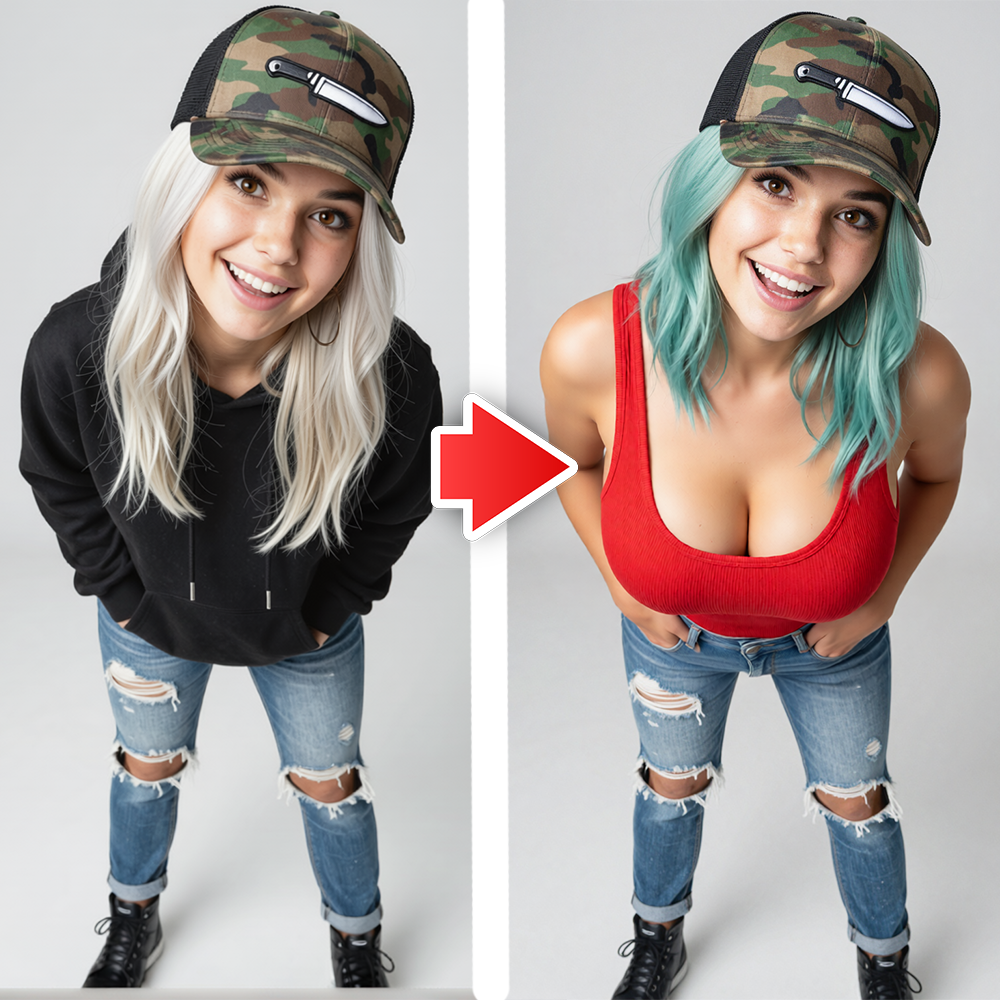
This optimized ComfyUI workflow delivers smooth, high-quality inpainting for all types of edits — whether you’re fixing small imperfections, removing unwanted objects, changing clothing, restoring details, or adding new elements to your images. The Qwen Rapid AIO model handles blending, texture matching, and lighting consistency remarkably well, giving you results that look natural and professional in significantly less time compared to heavier models.

Key Advantages of This Workflow:

  1. Extremely fast generation speed thanks to Qwen Rapid AIO
  2. Clean and seamless inpainting with minimal artifacts
  3. Excellent texture and detail preservation
  4. Natural skin, fabric, and material blending
  5. Smart lighting and color tone matching
  6. Great performance even with complex masks
  7. Ideal balance between speed and quality

This workflow is perfect for creators who work on tight deadlines or need to test multiple variations quickly. It shines in everyday practical tasks such as:

  1. Face retouching and blemish removal
  2. Object removal or replacement
  3. Clothing and accessory changes
  4. Background cleanup and replacement
  5. Photo restoration
  6. product photo editing for e-commerce
  7. Quick creative modifications

The workflow is designed to be efficient and user-friendly. It features a clean node structure, optimized sampling settings, and flexible mask handling so you can achieve precise control without making the process complicated. Even if you’re relatively new to ComfyUI, you’ll be able to get great results quickly, while advanced users can further fine-tune parameters for even better output.

What Makes Qwen Rapid AIO Special for Inpainting:

Qwen Rapid AIO brings a unique combination of speed and intelligence. It understands context very well, maintains consistency with surrounding areas, and produces natural transitions between edited and non-edited regions. This makes it especially useful when you want to do rapid prototyping or batch editing without waiting long queues.

What You’ll Get in This Package:

  1. Fully loaded ComfyUI JSON workflow file (ready to import)
  2. Step-by-step setup and installation guide
  3. Recommended model settings and sampler configurations
  4. Best prompt practices for Qwen Rapid AIO inpainting
  5. Multiple before & after example images
  6. Tips for creating effective masks and achieving maximum realism
  7. Troubleshooting guide for common inpainting scenarios

Whether you’re a professional photographer, digital artist, content creator, or AI art enthusiast, this Qwen Rapid AIO Inpainting Workflow will save you valuable time while delivering impressive realistic results.

Stop wasting time on slow inpainting models.

Get this fast, reliable, and high-quality workflow today and make your image editing process smoother, quicker, and more professional.

Perfect for daily use, client work, or rapid creative experimentation.
Reviews

There are no reviews yet.

Be the first to review “Realistic Inpainting -Qwen Rapid AIO Edition”

Your email address will not be published. Required fields are marked *

Description

This optimized ComfyUI workflow delivers smooth, high-quality inpainting for all types of edits — whether you’re fixing small imperfections, removing unwanted objects, changing clothing, restoring details, or adding new elements to your images. The Qwen Rapid AIO model handles blending, texture matching, and lighting consistency remarkably well, giving you results that look natural and professional in significantly less time compared to heavier models.

Key Advantages of This Workflow:

  1. Extremely fast generation speed thanks to Qwen Rapid AIO
  2. Clean and seamless inpainting with minimal artifacts
  3. Excellent texture and detail preservation
  4. Natural skin, fabric, and material blending
  5. Smart lighting and color tone matching
  6. Great performance even with complex masks
  7. Ideal balance between speed and quality

This workflow is perfect for creators who work on tight deadlines or need to test multiple variations quickly. It shines in everyday practical tasks such as:

  1. Face retouching and blemish removal
  2. Object removal or replacement
  3. Clothing and accessory changes
  4. Background cleanup and replacement
  5. Photo restoration
  6. product photo editing for e-commerce
  7. Quick creative modifications

The workflow is designed to be efficient and user-friendly. It features a clean node structure, optimized sampling settings, and flexible mask handling so you can achieve precise control without making the process complicated. Even if you’re relatively new to ComfyUI, you’ll be able to get great results quickly, while advanced users can further fine-tune parameters for even better output.

What Makes Qwen Rapid AIO Special for Inpainting:

Qwen Rapid AIO brings a unique combination of speed and intelligence. It understands context very well, maintains consistency with surrounding areas, and produces natural transitions between edited and non-edited regions. This makes it especially useful when you want to do rapid prototyping or batch editing without waiting long queues.

What You’ll Get in This Package:

  1. Fully loaded ComfyUI JSON workflow file (ready to import)
  2. Step-by-step setup and installation guide
  3. Recommended model settings and sampler configurations
  4. Best prompt practices for Qwen Rapid AIO inpainting
  5. Multiple before & after example images
  6. Tips for creating effective masks and achieving maximum realism
  7. Troubleshooting guide for common inpainting scenarios

Whether you’re a professional photographer, digital artist, content creator, or AI art enthusiast, this Qwen Rapid AIO Inpainting Workflow will save you valuable time while delivering impressive realistic results.

Stop wasting time on slow inpainting models.

Get this fast, reliable, and high-quality workflow today and make your image editing process smoother, quicker, and more professional.

Perfect for daily use, client work, or rapid creative experimentation.

Reviews

There are no reviews yet.

Be the first to review “Realistic Inpainting -Qwen Rapid AIO Edition”

Your email address will not be published. Required fields are marked *

0