Description
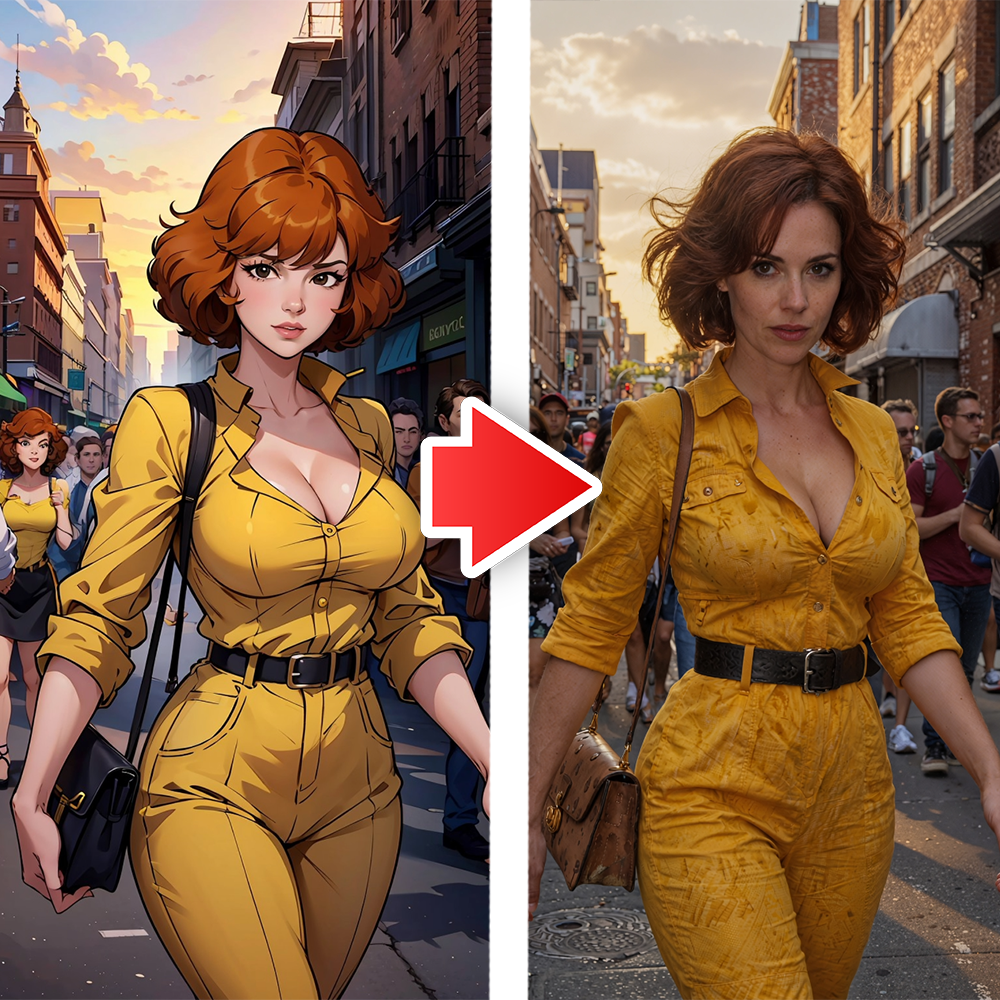
Many cartoon-to-realism workflows suffer from broken anatomy, loss of character likeness, unnatural skin tones, or plastic-looking results. This workflow is optimized to overcome those issues by intelligently translating cartoon features into realistic human anatomy, skin textures, lighting, and materials — producing images that look like professional studio photographs.
What This Workflow Excels At:
- Converting anime, western cartoons, comic book art, or any 2D illustration into photorealism
- Preserving strong character identity (face, hairstyle, expression, and signature look)
- Generating natural and detailed skin textures with realistic pores, freckles, and subsurface scattering
- Creating believable fabric, clothing folds, and material details
- Applying realistic lighting, shadows, and cinematic depth of field
- Maintaining accurate proportions and perspective from the original image
Ideal For:
- Turning beloved anime/cartoon characters into realistic versions
- Creating realistic character references for 3D modeling, cosplay, or illustration
- Generating high-quality social media content and fan art
- Building consistent realistic character sheets
- Producing “what if this cartoon character was real” style images
- Fast concept development and style exploration
- Portfolio pieces for digital artists and character designers
- Key Advantages of Z Image Turbo in this Workflow:
Z Image Turbo brings excellent speed combined with strong image-to-image capabilities. This makes the workflow significantly faster than heavier models while still achieving impressive realistic output. The model handles style translation very well — it removes the cartoon shading and lines while adding natural details, realistic eyes, hair strands, and lifelike skin without losing the soul of the original character.
The Comfy-UI workflow is clean, efficient, and well-structured. It includes smart preprocessing, optimized denoising settings, and prompt engineering tailored specifically for cartoon-to-realism conversion. You get great control over how much realism you want — from semi-realistic to full photorealistic level.
What’s Included in This Package:
- Fully ready Comfy-UI JSON workflow file
- Step-by-step installation and setup instructions
- Recommended model settings and sampler configurations
- Specially crafted prompt guide for best cartoon-to-realism results
- Multiple before-and-after example images (cartoon → hyper-realistic)
- Tips and tricks for handling different cartoon styles and achieving maximum realism
Whether you are a digital artist, anime fan, cosplay enthusiast, character designer, or content creator, this Cartoon to Hyper-Realism Workflow using Z Image Turbo will become one of your most used tools.
Stop spending hours trying to manually make cartoons look real.
Let this fast and powerful workflow do the heavy lifting and generate breathtaking realistic versions of any cartoon character in minutes.
Bring your 2D characters to life with stunning photorealism — quickly, consistently, and with professional quality.

skykanoujiya –
Stunning